 |
FREE !!! |
|
|
|
FREE !!! |
|
*** Click Here to checkout the NEW OFFICIAL website for Monitor Dot! ***
10/24/22 - Story
behind this
app:
For a long time there was a popular app that was free to use by everyone. Then
recently the app suddenly displayed a message stating that a mandatory update
was required.
This update basically changed the app into a trial version that expired within
hours after installing it. To continue using the app, the company now wants a
monthly fee!
So, because they got greedy and
decided to screw over their users by disabling everyone's app without notice, I
decided to return the favor by creating my own app and giving it away for
FREE!*
Their loss, your gain.
...and please enjoy my
retro webpage design :)
Check out TechDoctorUK's review of VPN Monitor Dot:
How will VPN Monitor Dot help protect my Privacy?
VPN's help protect your privacy when you are on the internet. But they can only
do that when they are working properly.
Even if a VPN has it's "Auto-Start" feature enabled,
there is no guarantee that it will properly run 100% of the time when you power
on/bootup your device.
And even when a VPN is running properly, it may
suddenly disconnect or crash even hours later without giving you any warning!
This is why using VPN Monitor Dot
is so important
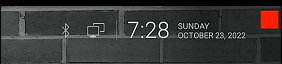
VPN Monitor Dot will continuously monitor your VPN connection and let you know it's working by displaying a status "Dot" in the top right corner of your screen...
When you ARE being protected by your VPN, the app will slowly flash a GREEN dot:
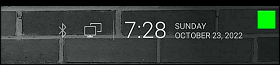
But when you are NOT being protected by your VPN (because the VPN is not turned on or it crashed), then the app will slowly flash a RED dot:
----- VPN Monitor Dot vs. the
"Other Guy's" app -----
1) Why does the "Other Guy's" app need
Read/Write Access Permission to my device's photo/files Storage?
I have no idea why the other app
needs it, but keep in mind
that because their
app also has internet access,
it could theoretically add/delete or
send your files to a remote cloud server without your knowledge or approval!
VPN Monitor Dot does not need this potentially dangerous permission
in order to fully protect you :)
2) VPN Monitor Dot was designed in a highly
efficient way to minimize it's memory/resource footprint.
Just see the
difference for
yourself:
|
The Other Guy's ---- vs. ---- VPN Monitor Dot APK
size: |
Size does matter, and being x100
TIMES
BIGGER is NOT a good thing!
Why is Smaller Better?
Because VPN Monitor Dot uses very little resources when running, it has a much higher chance of
staying loaded in memory whenever
Android decides to start killing processes to free up
resources.
That means VPN Monitor Dot will be able to stick around to help keep you protected.
The last thing you want is for your VPN to crash and never know it because the
monitoring app was killed!
IMPORTANT NOTES:
|
Installation:
|
Need additional help with installation?
Click here
for an easy tutorial from Troypoint.com!
Select the option (This wipes data but provides a clean install).
. It controls everything from the user interface (LG UX) to hardware components like the camera, display, and radios.
Flashing the is the ultimate remedy for severe software corruption, system slow-downs, or carrier modification needs on the LG K51. By utilizing a patched LG UP tool, installing proper drivers, and sourcing the correct carrier-specific KDZ file, you can successfully breathe new life into your smartphone.
Open the LGUP application on your PC. It should recognize the device as LM-K500UM . Select Process: Upgrade: Keeps your data (use for normal updates). lm-k500um firmware
Understanding your device's firmware is critical for resolving issues like software loops, "bricks," or performance lag. Core Device Specifications
The official LG USB drivers must be installed on your PC so it can communicate with the phone.
: Because this model is carrier-specific, firmware intended for a Metro (TMK) device should not be flashed onto a Boost (BST) device, as this can lead to "CrossDL" errors or permanent bricking. 3. Flashing and Recovery Tools Select the option (This wipes data but provides
Installing official firmware generally does not void the warranty, but unofficial, modified firmware will.
Factory Reset Protection (FRP) is a security feature that can lock a user out of a phone after a factory reset if the previous Google account credentials are not known. Users have discussed using various methods to reset FRP on the LM-K500UM, including specialized software like Octoplus FRP Tool or attempting to downgrade the device to an older firmware version (e.g., version V20) before resetting FRP.
: A standalone partition used for factory resets and system updates. 2. Versioning and Regional Variants Flashing the is the ultimate remedy for severe
Since LG's official mobile servers are no longer as active as they once were, users often rely on reputable third-party databases:
To avoid emergencies, adopt these professional habits:
(If vendor provides specific instructions, follow those exactly. The steps below are generic.)
Note: Firmware files are large (approx. 2.5 GB - 3.5 GB), so ensure you have a stable internet connection. Requirements to Flash LM-K500UM Firmware Before flashing, you must have the following tools: : Download Here.
: It wipes out deep software bugs or spyware that a standard factory reset cannot touch.